- Developer
- Sharpen Solutions
- Installs
- 100+
- Downloads
- 0
- Views
- 1
- Updated
- Nov 4, 2026
Screenshots
About Expense Tracker: Budget App
Expense Tracker: Budget App – Manage Daily Spending and Plan Your Finances
Keeping personal finances organized can be challenging when daily purchases, monthly bills, savings, and loan payments all need attention. Many people still use notebooks or spreadsheets to record their spending, but updating these records regularly can take time. An expense tracking app can make this process easier by bringing important financial information together in one place.
Expense Tracker: Budget App is a personal finance application designed to help users record transactions, create budgets, monitor spending, and manage different financial responsibilities. It also includes tools for savings goals, debt payments, shared expenses, and financial reports.
One of its main features is its offline-first approach. Users can manage their daily transactions without creating an account or connecting their bank accounts. The app is designed for people who want a simple way to understand their spending while keeping control of their financial information.
What Is Expense Tracker: Budget App?
Expense Tracker: Budget App is a money management tool that helps users keep track of income and expenses. It provides a collection of features for organizing daily spending, planning monthly budgets, monitoring bills, and reviewing financial progress.
The application is suitable for different types of users, including students, families, freelancers, and people who want to replace their traditional expense notebooks.
You can use it to record everyday purchases, attach receipts, create spending limits, and check how much money is available for the rest of the day. It also offers additional financial tools for managing loans, subscriptions, savings, and shared bills.
Main Features of Expense Tracker: Budget App
1. Quick Daily Expense Recording
Recording expenses regularly is important if you want to understand your spending habits. This app makes the process simple with a large numeric keypad and category selection.
You can enter an amount, select a category, and save the transaction in a few steps. There is also an option to attach receipts, notes, and tags to individual records.
These additional details can help you remember where your money was spent and make it easier to review transactions later.
Another useful point is that the app works offline. You can record expenses while travelling, abroad, or in places where an internet connection is unavailable.
2. Monthly Budget Planner
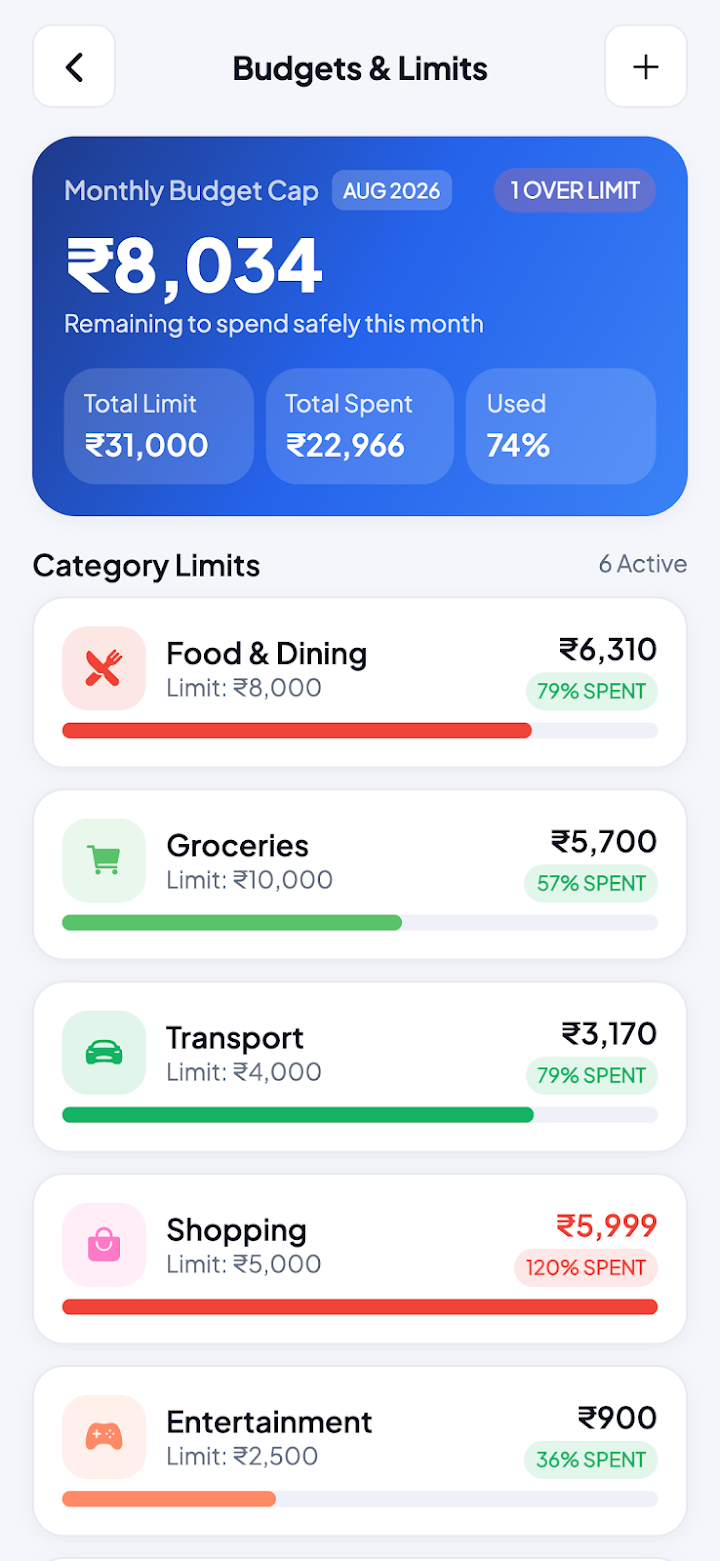
Creating a monthly budget helps you decide how much money you can spend on different needs. The app allows users to set budgets for individual categories and monitor their progress throughout the month.
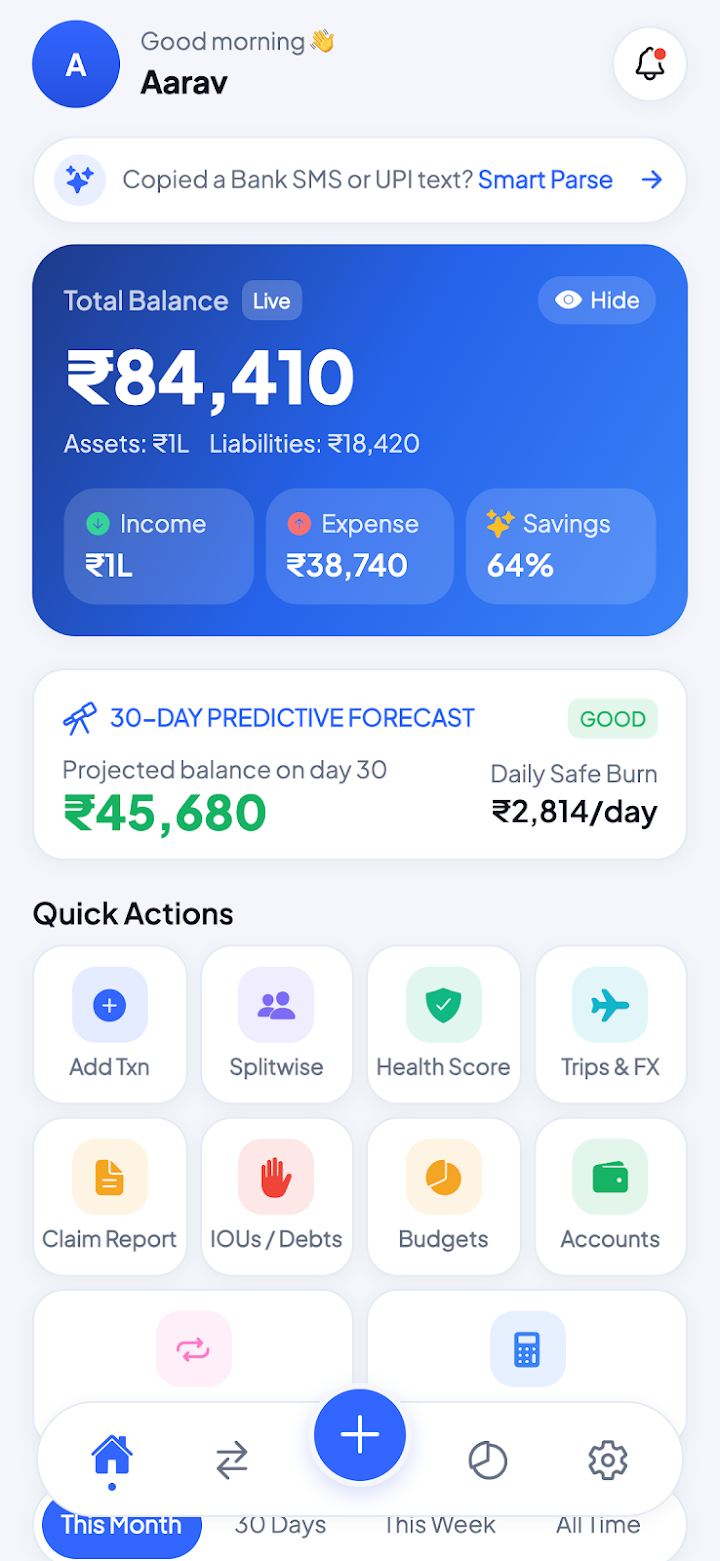
One interesting feature is the daily safe-to-spend amount. Instead of only showing your remaining monthly budget, the app helps you understand how much you can spend today while staying within your plan.
It also includes a 50/30/20 budgeting planner. This method divides income into three general areas:
- 50% for Needs: Essential costs such as rent, groceries, and bills.
- 30% for Wants: Entertainment, shopping, and other personal choices.
- 20% for Savings: Money set aside for future goals or financial security.
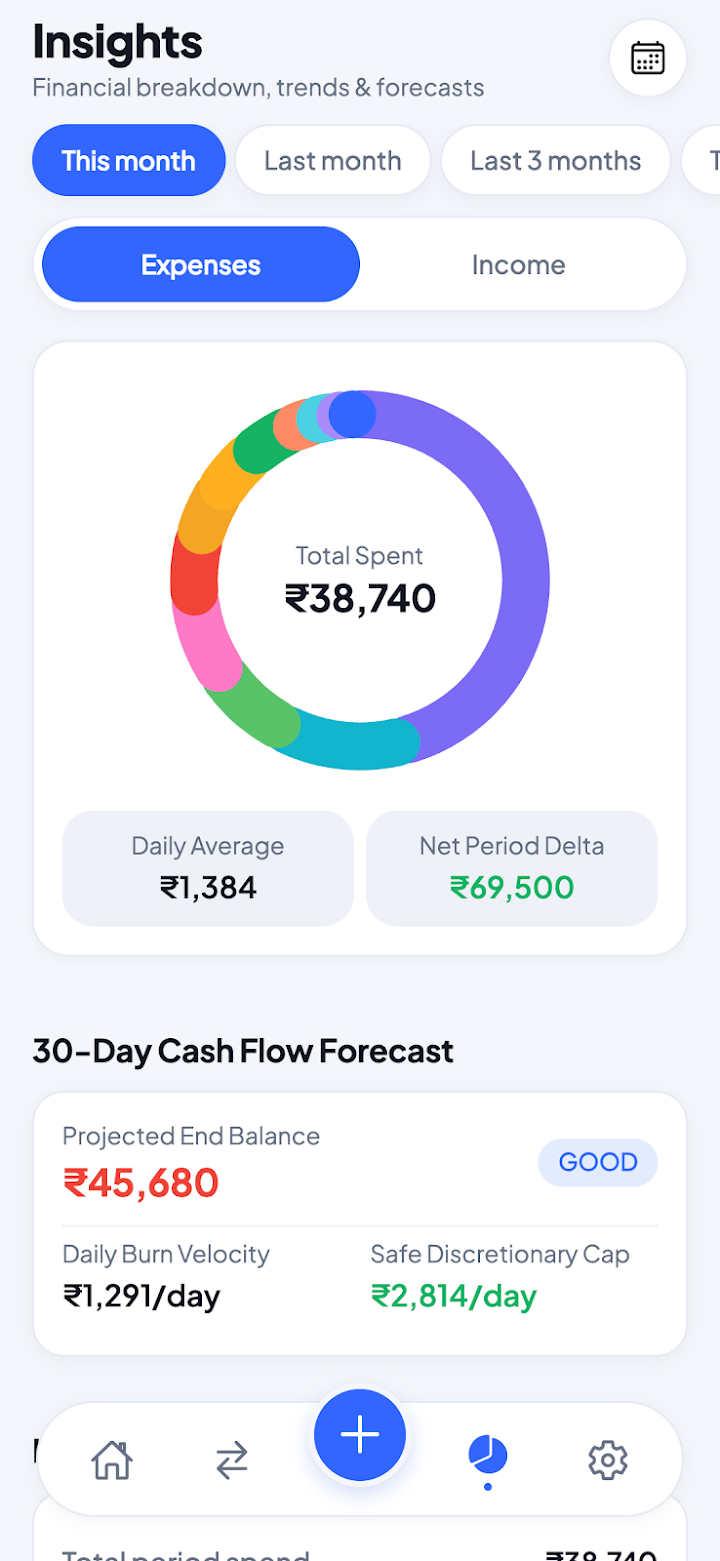
Users can also view charts showing how their money has been distributed during the month.
3. 30-Day Cash Forecast
Planning ahead can help prevent unexpected financial pressure. Expense Tracker: Budget App includes a 30-day cash forecast that gives users a view of their expected financial position.
This feature can be helpful when planning upcoming expenses, checking available funds, and preparing for the next payday.
Rather than looking only at past transactions, users can use the forecast to get a better idea of their upcoming cash flow.
4. Bill and Subscription Reminders
Monthly payments can sometimes be forgotten, especially when several bills have different due dates. The app includes reminders for recurring bills and subscriptions.
You can use this feature to keep track of regular payments such as rent, electricity, internet, insurance, and online services.
Receiving reminders before a payment is due can help users prepare their budgets and avoid missing important payment dates.
5. Loan and Debt Management
Managing borrowed money requires proper records. The app includes loan and debt tracking tools that help users monitor outstanding amounts, interest, and expected payoff dates.
It also provides two repayment planning methods
Debt Avalanche: This method focuses on paying off debts with higher interest rates first. It can help reduce the total interest paid over time.
Debt Snowball: This approach focuses on clearing smaller debts first. Paying off individual balances can give users a sense of progress and motivation.
These tools help users organize repayment plans and understand how much they still need to pay.
6. Split Bills with Friends
Sharing expenses is common during group trips, dinners, and household arrangements. However, calculating everyone's contribution can become confusing when different people pay for different things.
The app includes a group expense-splitting feature that allows users to divide shared bills and track who owes money to whom.
It can be useful for friends travelling together, roommates sharing household costs, or colleagues arranging group meals.
By keeping shared expenses organized, participants can understand their individual balances and settle payments more easily.
7. Savings Goals and Financial Health Score
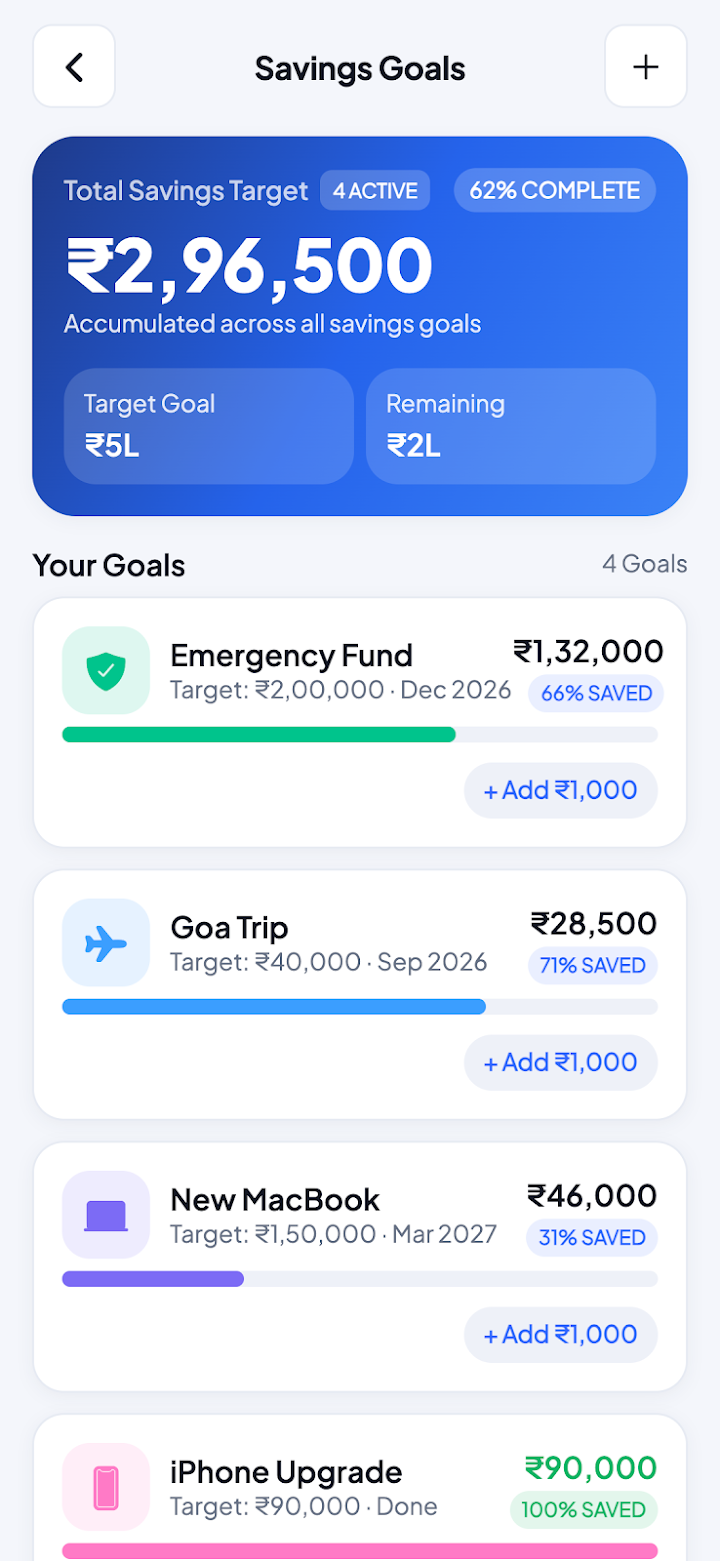
Saving money becomes easier when you have a clear target. The app allows users to create savings goals with target amounts and completion dates.
You can use this feature for different plans, such as buying a new device, arranging a holiday, paying education expenses, or building an emergency fund.
The application also includes a financial health score based on areas such as savings, budgeting, debt, and emergency financial coverage.
This provides another way to review your financial habits and identify areas that may need attention.
8. Net Worth Tracking
Your financial position is not only about monthly income and expenses. It can also include savings, cash, accounts, and other assets.
Expense Tracker: Budget App offers a net worth tracking feature that brings these details together. Users can add their financial accounts, cash holdings, and assets to get a broader view of what they own.
This can be useful for people who want to monitor their overall financial progress instead of focusing only on daily spending.
9. Multi-Currency and Travel Mode
People who travel internationally may need to manage expenses in different currencies. The app includes multi-currency support and a travel mode designed for trips abroad.
This can make it easier to organize travel spending without mixing every transaction into a single currency record.
It may be particularly useful for frequent travellers, international students, and people who regularly handle payments in more than one currency.
10. Invoices and Client Records for Freelancers
Freelancers often need to manage both personal expenses and work-related payments. The app includes invoice and client ledger features that can help organize this information.
These tools allow freelancers to maintain client-related records alongside their regular financial transactions.
This can be useful for independent workers who want a simple place to review their expenses and keep track of business-related payments.
11. Import and Export Financial Records
Keeping a backup or separate copy of financial records can be useful for future reference. The app supports importing transaction information from bank statements in CSV format.
It also provides CSV and PDF export options, allowing users to save their financial information for reviewing, sharing, or preparing records for tax-related purposes.
These options can make it easier to work with financial data outside the application.
Privacy and Offline Functionality
Privacy is an important consideration when choosing a personal finance application. Expense Tracker: Budget App is designed to store transaction records in a database on the user's phone rather than sending them to the developer's servers.
According to its description, the app does not require sign-up, bank login, or cloud synchronization. It also states that it does not sell user data, although anonymous usage statistics are recorded.
For additional protection, the application includes biometric and PIN-based app locking.
Backup and restore options are also available under the user's control. This gives users more flexibility when managing their financial records.
Is Expense Tracker: Budget App Free?
The app offers a free version with several useful features. Users can access unlimited expenses, budgets, shared expense groups, and savings goals without paying.
There is also an optional Pro upgrade for people who need additional tools. The Pro version includes advanced reports, unlimited budgets, premium themes, CSV import, and the full cash forecast.
According to the app description, users can choose a one-time Lifetime option rather than being forced into a recurring subscription.
Anyone considering the upgrade should check the current pricing and plan details inside the app.
Who Should Use This App?
Expense Tracker: Budget App can be useful for people with different financial needs.
- Students: Keep track of daily spending, food costs, transportation, and monthly allowances.
- Families: Organize household budgets, regular bills, and shared expenses.
- Freelancers: Manage client records, invoices, and personal spending in one place.
- Travellers: Track expenses in different currencies while visiting other countries.
- Budget-Conscious Users: Monitor spending limits and understand how much money remains available.
- People Managing Debt: Keep repayment records and plan a suitable debt payoff strategy.
My Personal Opinion About Expense Tracker: Budget App
In my opinion, this application offers more than basic expense recording. Its combination of daily tracking, budget planning, debt management, savings goals, and bill reminders makes it a useful option for people who want to organize several areas of their finances.
I particularly like the daily safe-to-spend feature because it gives users a more practical way to think about their remaining budget. The debt repayment methods and group bill-splitting tools also add value for people dealing with different financial responsibilities.
Another positive point is the offline design and optional upgrade structure. Users can start with the free features without immediately committing to a paid plan.
However, the app includes many tools, so new users may need some time to explore everything. Its reports and financial insights will also be more useful when transactions and account information are entered accurately.
Overall, it looks like a flexible choice for people who want more control over their everyday money management.
Final Words
Expense Tracker: Budget App brings several personal finance tools into one application. Users can record daily expenses, create monthly budgets, monitor bills, track loans, split group costs, and plan savings goals.
Its offline functionality, privacy-focused design, and optional Pro upgrade make it an interesting option for people who prefer managing their financial information directly on their devices.
Whether you are a student trying to control daily spending, a freelancer organizing client payments, or a family planning monthly expenses, this app provides different tools to support your financial routine. If you want a convenient way to understand where your money goes, Expense Tracker: Budget App may be worth exploring.